I use Java scripts to automate work in Salesforce. They help me work around Batch Apex limits and run many tasks at once. This article shows how I handle login so the scripts can keep working as tokens expire.
Pasting a Salesforce access token into a Java script works until the token expires. For a tool you run locally, you can sign in through the browser and let the client manage tokens.
salesforce-oauth-web creates an OkHttp client that opens Salesforce login on the first API request. You sign in, complete MFA if required, and approve access. The client handles OAuth 2.0, PKCE, and token refresh. Your code makes ordinary HTTP requests:
var clientId = System.getenv("SALESFORCE_CLIENT_ID");
var salesforceDomain = System.getenv("SALESFORCE_DOMAIN");

OkHttpClient client = SalesforceOAuth.authenticate(clientId, salesforceDomain);

HttpUrl limitsUrl = HttpUrl.get(salesforceDomain).newBuilder()
    .addPathSegments("services/data/v66.0/limits")
    .build();
Request request = new Request.Builder().url(limitsUrl).get().build();

try (Response response = client.newCall(request).execute()) {
  System.out.println(response.body().string());
}
The full example reads the consumer key, My Domain URL, and API version from environment variables. It needs no username, password, token, or consumer secret in the configuration.
Handle authentication in the HTTP client
Managing tokens in each API call means repeating the same work: add an Authorization header, refresh expired tokens, and retry failed requests. Concurrent calls also need to agree on which token to use.
An OkHttp interceptor handles that work in one place. SalesforceOAuth.authenticate(...) returns immediately. The browser opens only when the client first calls the configured Salesforce origin. You can use the client anywhere an OkHttpClient is expected.
The interceptor sends the Salesforce bearer token only to the configured origin. Requests to other origins receive no Salesforce token.
public Response intercept(Chain chain) throws IOException {
  var request = chain.request();
  if (!sameOrigin(request.url(), salesforceOrigin)) {
    return chain.proceed(request);
  }

  var requestToken = tokenState;
  if (requestToken.value() == null) {
    requestToken = reauthenticate(requestToken);
  }

  var response = chain.proceed(withAccessToken(request, requestToken.value()));
  if (response.code() == 401) {
    response.close();
    var newToken = reauthenticate(requestToken);
    return chain.proceed(withAccessToken(request, newToken.value()));
  }

  return response;
}
A 401 makes the interceptor close the response, get a new access token, and retry once. If that retry also fails, it returns the response to the caller. Concurrent requests compare the TokenState object they used with the current one. Refresh is synchronized: one request replaces the token state, and the others reuse it. This prevents duplicate logins and attempts to use the same rotating refresh token twice.
Tests cover both cases: four simultaneous first requests trigger one authorization, and a request to a second local origin receives no bearer token.
Sign in through the browser
An authorization-code flow needs a redirect URI, but a local Java program does not need a permanent web server. It starts a JDK HttpServer on localhost:8999 only while authorization is in progress and registers one route: /oauth/callback.
Before opening Salesforce, the client creates two fresh values:
state, returned unchanged by Salesforce and checked by the callback to reject an unrelated or forged response;- a PKCE verifier and its SHA-256 challenge, which bind the authorization code to the process that initiated the flow.
private HttpUrl authorizationUrl(String state, Pkce pkce) {
  return endpoint("services/oauth2/authorize")
      .addQueryParameter("response_type", "code")
      .addQueryParameter("client_id", clientId)
      .addQueryParameter("redirect_uri", CALLBACK_URL.toString())
      .addQueryParameter("state", state)
      .addQueryParameter("scope", "api refresh_token")
      .addQueryParameter("code_challenge", pkce.challenge())
      .addQueryParameter("code_challenge_method", "S256")
      .build();
}

private static Pkce create() {
  var verifier = UUID.randomUUID() + "." + UUID.randomUUID();
  return new Pkce(verifier, sha256UrlSafe(verifier));
}
The authorization URL opens through Desktop.browse. If that is unavailable, the same URL is printed so it can be opened manually. Salesforce handles the login, MFA, and consent screens. It then redirects to localhost with a code and the original state. The callback compares state in constant time, returns a plain success or error page to the browser, and stops the server as soon as the waiting Java call continues.
The client sends the code and original PKCE verifier to /services/oauth2/token. The code alone is not enough to obtain tokens. PKCE protects this exchange without a consumer secret embedded in the script. Salesforce's web-server flow documentation describes the protocol used here.
Configure the External Client App
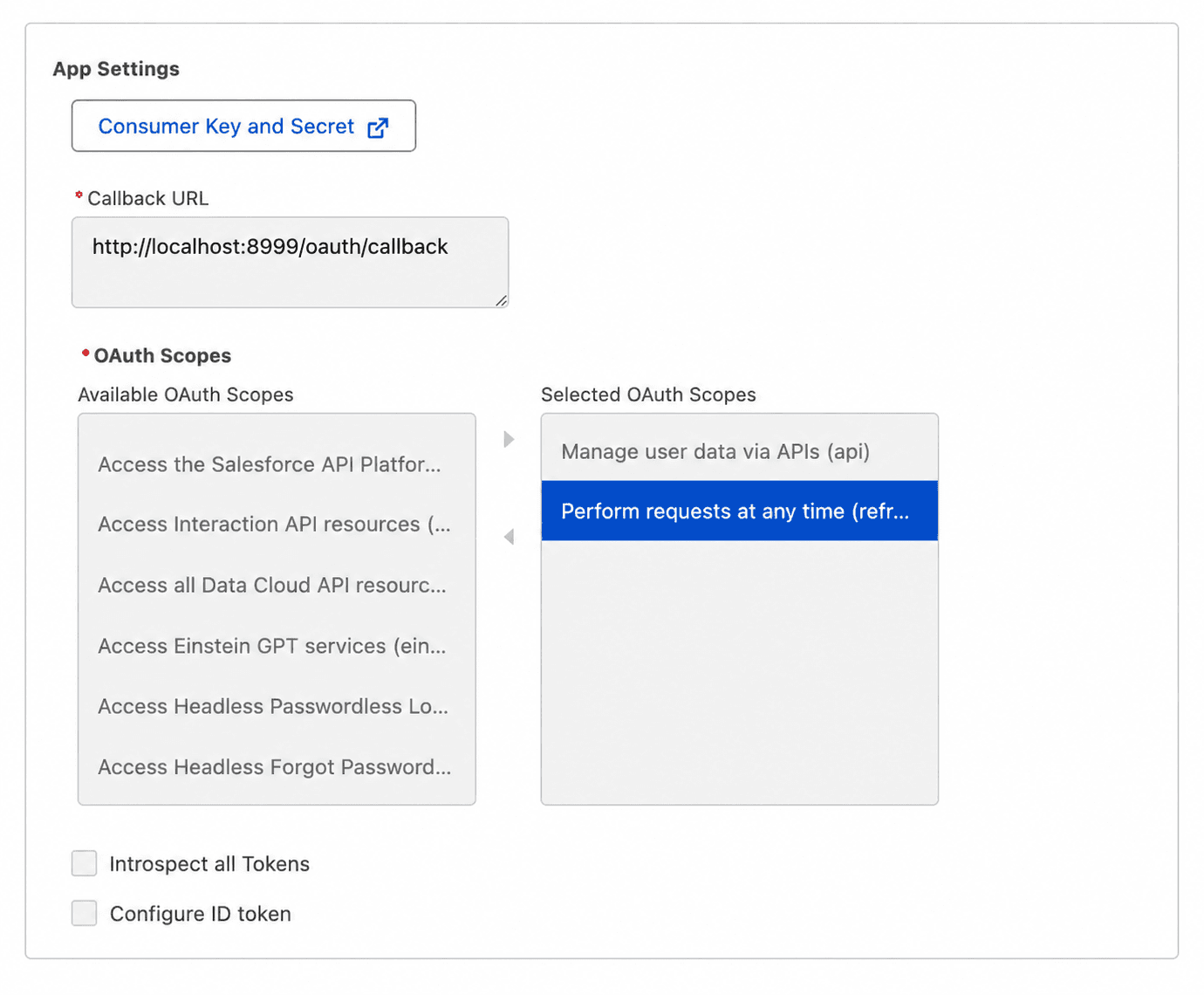
OAuth code and Salesforce configuration must agree exactly. Create an External Client App, enable OAuth, and set these values:
- callback URL:
http://localhost:8999/oauth/callback; - Manage user data via APIs (
api) scope; - Perform requests at any time (
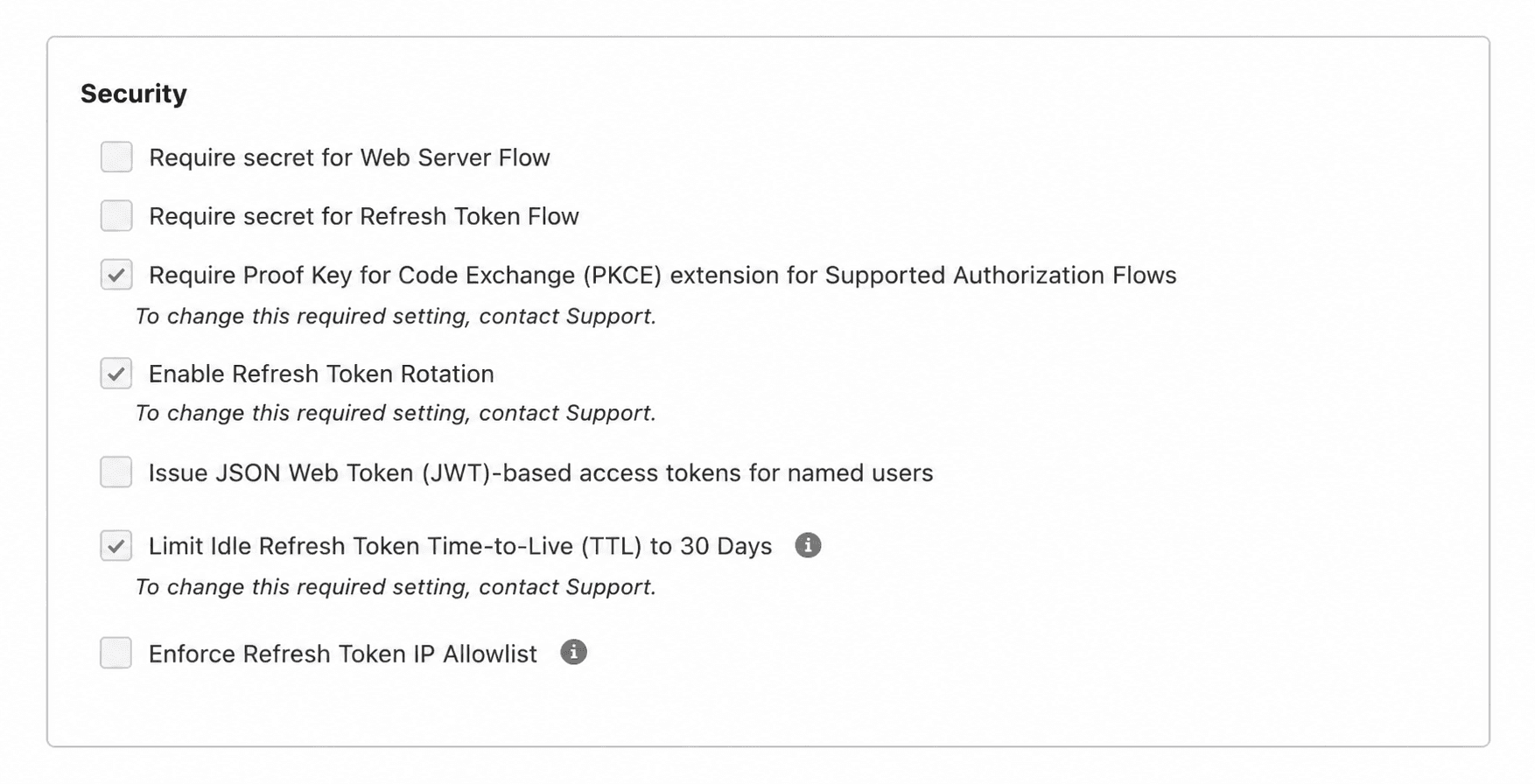
refresh_token,offline_access) scope; - Require secret for Web Server Flow disabled;
- Require secret for Refresh Token Flow disabled;
- Require Proof Key for Code Exchange (PKCE) enabled;
- Enable Refresh Token Rotation enabled.
The app requests only two scopes. api permits Salesforce API calls; refresh_token allows the session to continue after the access token expires. If Salesforce does not issue a refresh token, the client fails immediately instead of silently degrading into a browser prompt on every expiry.
The two secret requirements are disabled because the script runs on the user's machine, where an embedded secret could be extracted. PKCE protects the authorization-code exchange without a shared secret.
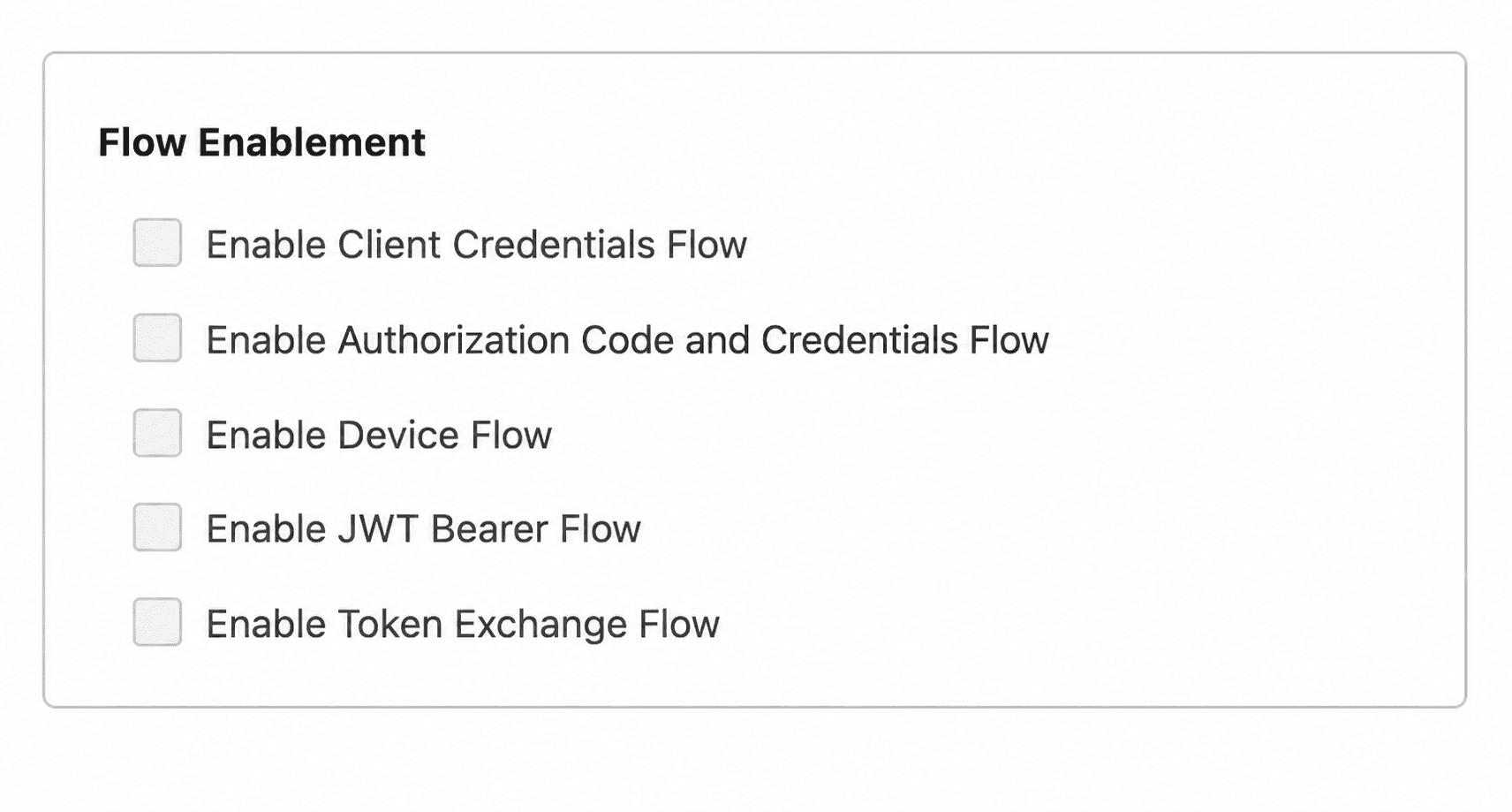
Leave the Flow Enablement switches off for this setup. Enable Authorization Code and Credentials Flow belongs to Salesforce Headless Identity; it does not enable the standard authorization-code grant used here. Client Credentials, Device, JWT Bearer, and Token Exchange are also unnecessary for this client.
Save each replacement refresh token
With rotation enabled, each successful refresh returns a new refresh token and invalidates the previous one. Save the replacement before the next refresh.
The token provider keeps the current refresh token in memory. When an API request returns 401, it tries the refresh grant. If the response includes a rotated token, that token replaces the previous one. If the refresh token was revoked, expired, already used, or rejected for another reason, the provider clears it and returns to the browser flow.
public String get() {
  var tokens = refreshToken == null
      ? authorize()
      : refreshOrAuthorize();
  if (refreshToken == null && tokens.refreshToken() == null) {
    throw new SalesforceAuthenticationException(
        "Salesforce token response has no refresh_token");
  }
  if (tokens.refreshToken() != null) {
    refreshToken = tokens.refreshToken();
  }
  return tokens.accessToken();
}

private SalesforceTokens refreshOrAuthorize() {
  try {
    return tokenGateway.refresh(refreshToken);
  } catch (SalesforceAuthenticationException refreshFailure) {
    refreshToken = null;
    return authorize();
  }
}
If refresh fails, the browser opens and the user signs in again. The client stores tokens only in memory.
The client must do both parts correctly: save each replacement token and allow only one refresh at a time.
Set access and session policies
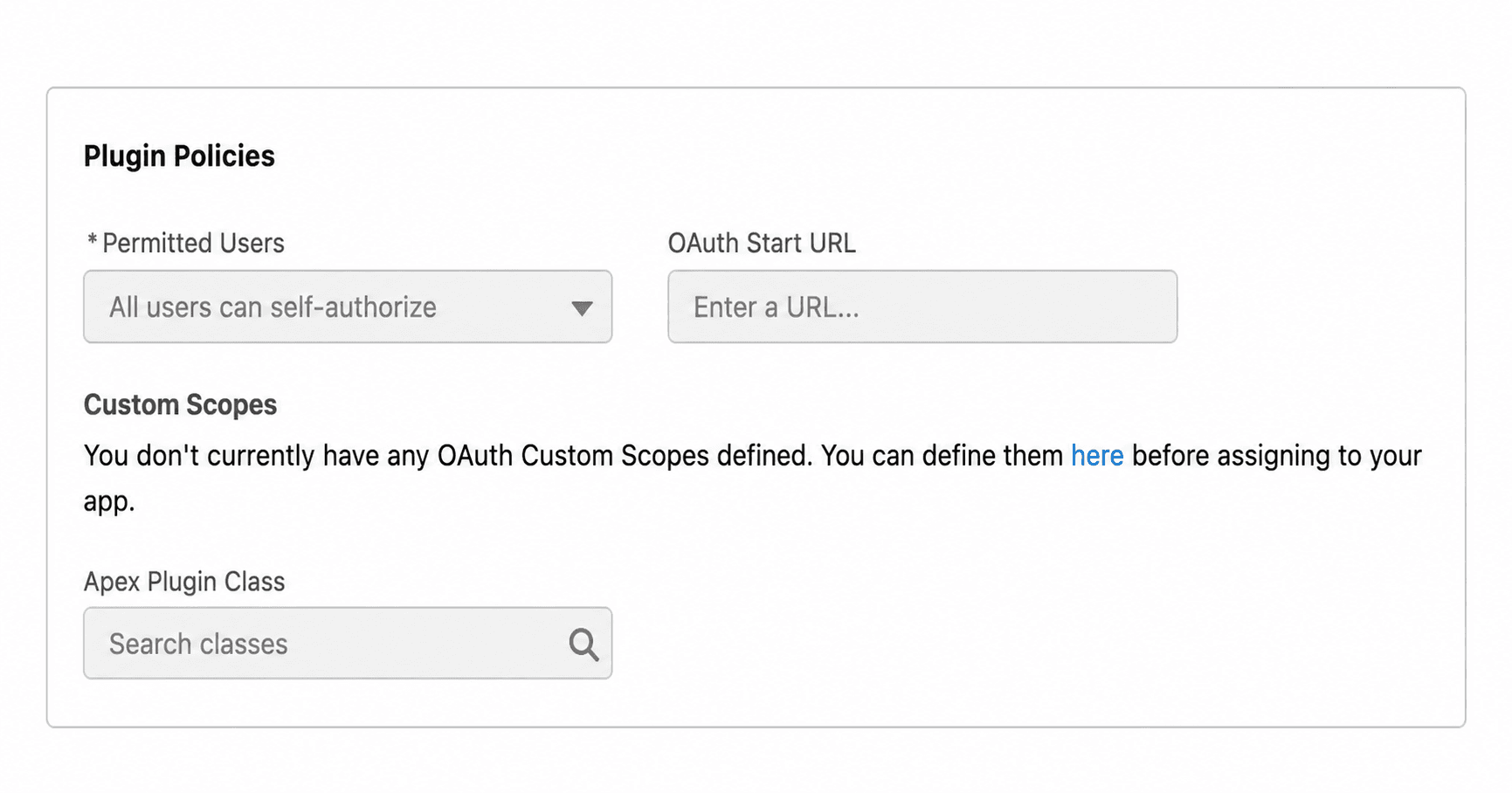
The External Client App's Policies tab controls who may authorize and how long the refresh chain can remain usable. All users can self-authorize is convenient while developing. For a controlled rollout, Admin-approved users are pre-authorized plus a dedicated permission set gives administrators a clear allowlist.
The authorization policy below expires a refresh token after 30 days without use. That is an idle window, not a fixed lifetime: each successful refresh resets it. Regularly used tools can continue without another browser round trip; a tool left unused for more than 30 days will attempt a refresh, receive a rejection, and open Salesforce login again.
Choose IP restrictions that match where the tool runs. A laptop changing networks may be blocked. A refresh-token IP allowlist requires predictable outgoing IP addresses.
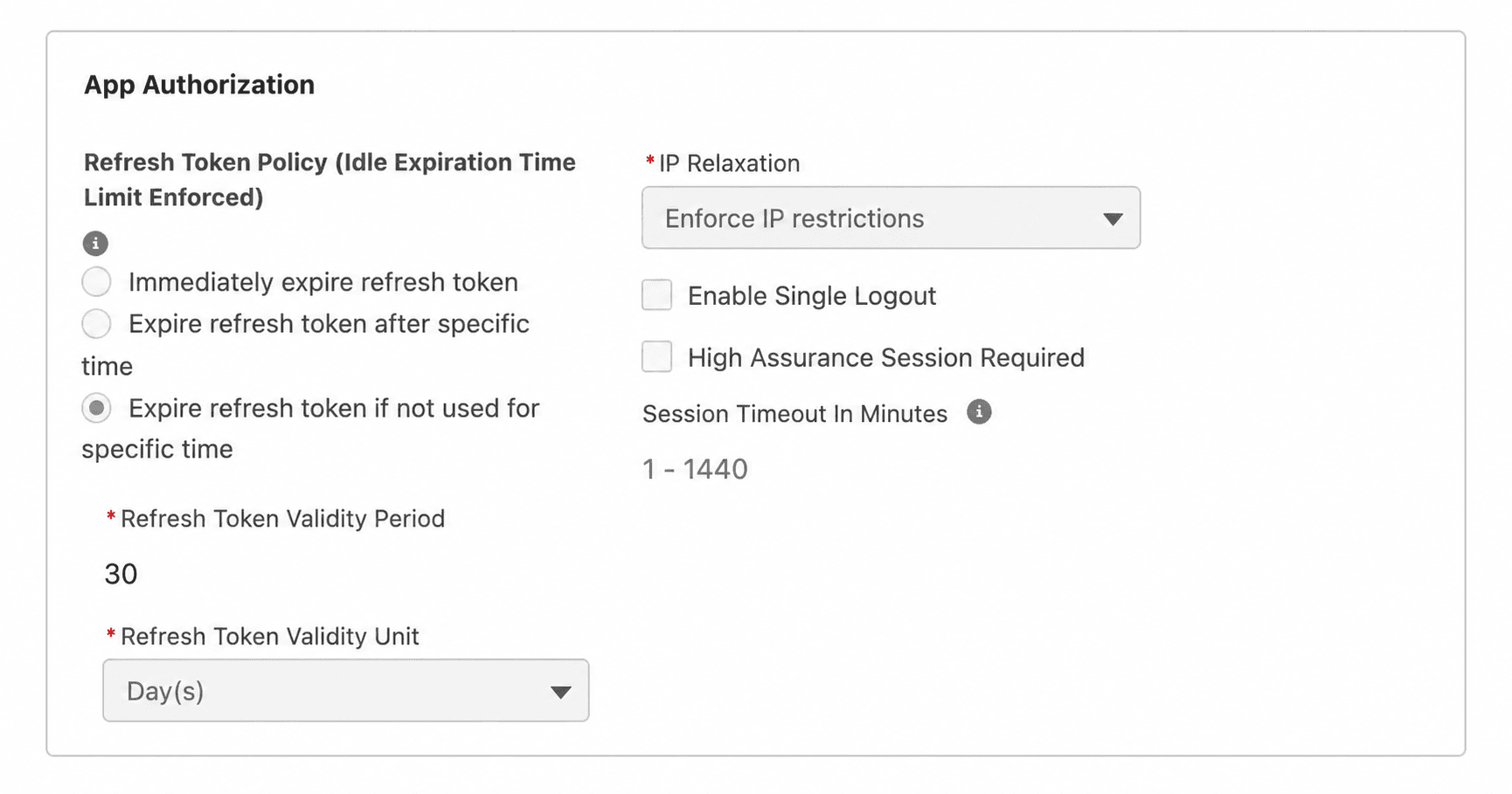
These settings control who can sign in, when they must sign in again, and which networks they can use.
When to use this client
Use this client for Java scripts, command-line utilities, and desktop tools that a person runs. The first API request after each restart requires browser login because tokens are kept only in memory. An expired or rejected refresh token also requires the user to sign in again.
For a server job that runs without a person, see Salesforce's official OAuth 2.0 client credentials flow guide. It explains how to exchange a consumer key and consumer secret for an access token tied to an integration user. That is a separate flow from the browser login used in this article, and it requires secure storage for the secret.
Tokens held in memory can still appear in JVM heap dumps, including old token values stored in String objects. Restrict access to the process and its dumps. The repository's security notes describe the relevant JVM controls.
For a local tool, the API stays simple: create the client, sign in when prompted, and make HTTP requests. The client manages tokens for the rest of the session.