
Many insurance claims stall not on the damage itself, but on paperwork. The file labeled "registration certificate" turns out to be the insurance policy, and the claim sits on hold while a letter goes out and the customer searches through their scans again.
This article shows how three Agentforce building blocks remove that friction at its source:
- Agentforce Record Snapshot lets a prompt template see the uploaded file.
- A structured output schema turns the model's answer into a typed domain contract.
- A confidence threshold, plus a few honest flags, decides when a human must review.
Together, they help the claim arrive complete on the first attempt.
Take a motor claim. Reduced to its simplest form, it has three steps:
- After an accident, the customer answers a few questions about what happened. Those answers determine which documents the claim requires.
- The customer uploads those documents.
- Someone checks whether each upload is what it claims to be.
Step 1 is a solved problem: the answers feed a rules engine. In essence a decision table that maps claim type and circumstances to a document checklist. Deterministic and not the topic here. Step 2 is a file upload. The gap is step 3. Today, nobody looks at the uploads until an advisor opens the claim days later, so a check that takes seconds per file turns into weeks of back-and-forth.
Our demo moves that check to the moment of upload. It is an Experience Cloud page where the screening has already produced three requirements: an accident statement signed by both drivers, the vehicle registration certificate, and photos of the damage.
An LLM classifies each upload against those three categories, and the checklist ticks itself off. The advisor receives a claim that is already sorted; the customer learns about a wrong upload in seconds instead of weeks. The classification is only a suggestion, more on that below. The full source code is on our GitHub.
Record Snapshot, when the record is a file
The classifier is built on an Agentforce Flex prompt template, executed from a Lightning web component (LWC) through Apex (ConnectApi.EinsteinLLM).
In Prompt Builder, standard templates are usually bound to explicit UI locations or CRM fields, such as Field Generation. Flex templates, by contrast, are designed for custom, multi-input background tasks. In our setup, we pass the expected categories as JSON (each with a key, a label, and a rich description) along with the uploaded file as a ContentDocument. The template evaluates both inputs and returns a structured payload.
A shortened version of the prompt is shown below:
You are a document classification assistant for insurance claim intake. You receive exactly one uploaded document and a list of expected document categories. Determine which category, if any, this document belongs to. ...

EXPECTED DOCUMENT CATEGORIES
{!$Input:expectedCategories}

DOCUMENT TO CLASSIFY:
{!$RecordSnapshot:claimDocument.snapshot}

CLASSIFICATION RULES
1. Select only from the supplied categories. Never invent, rename, merge, or generalize a category. ...
3. "No match" is a valid and expected outcome. ... Never force the closest fit.
The interesting line is the Record Snapshot, the Prompt Builder grounding mechanism you normally point at a record so that its field values are rendered as text where the placeholder sits. Point the same placeholder at a ContentDocument, and the behavior changes completely: instead of rendering text about the file, the template attaches the file itself. The image or PDF lands in front of a multimodal model, pixels included. One line of template markup replaces what would otherwise be custom integration work: reading ContentVersion blobs and sending base64 payloads to a model API.
This convenience has a security consequence. The Einstein Trust Layer masks sensitive data in prompt text, using patterns, entity recognition, and field classifications. The pixels of a scanned registration certificate are not prompt text, so the names, addresses, and numbers inside the document travel to the model unmasked. Zero-retention agreements at the LLM gateway still apply, but we add our own rule on top: the template forbids repeating personal values in any output field. The model may report "contains owner details and a VIN", never the VIN itself. That keeps sensitive data out of the structured response, and so out of logs downstream.
One document per prompt
An obvious alternative was batching: send five files in one call and pay for the instructions and category definitions once. On paper that is more token-efficient. We still decided against it. The saving is small, and it does not pay for the complexity batching brings.
A prompt built around one document is easier to ground, and easier to reason about. Every instruction refers to "the document". There is exactly one, so evidence from one file cannot leak into the verdict on another. The response stays flat: one result, no array to match back to the right file. Failures are isolated, and calls run in parallel from the LWC. The general rule: give the model the narrowest context that fully covers the task, and keep the unit of work small enough to verify. One document is a unit you can verify.
Structured output as a boundary
Flex templates can register an output schema, so the response arrives as typed JSON instead of prose to parse. The result is a clean separation of concerns. The prompt body stays in domain language: what distinguishes an accident statement from a police report, why a photographed paper document is not a "damage photo". The output contract lives in the schema, where each field carries its own definition.
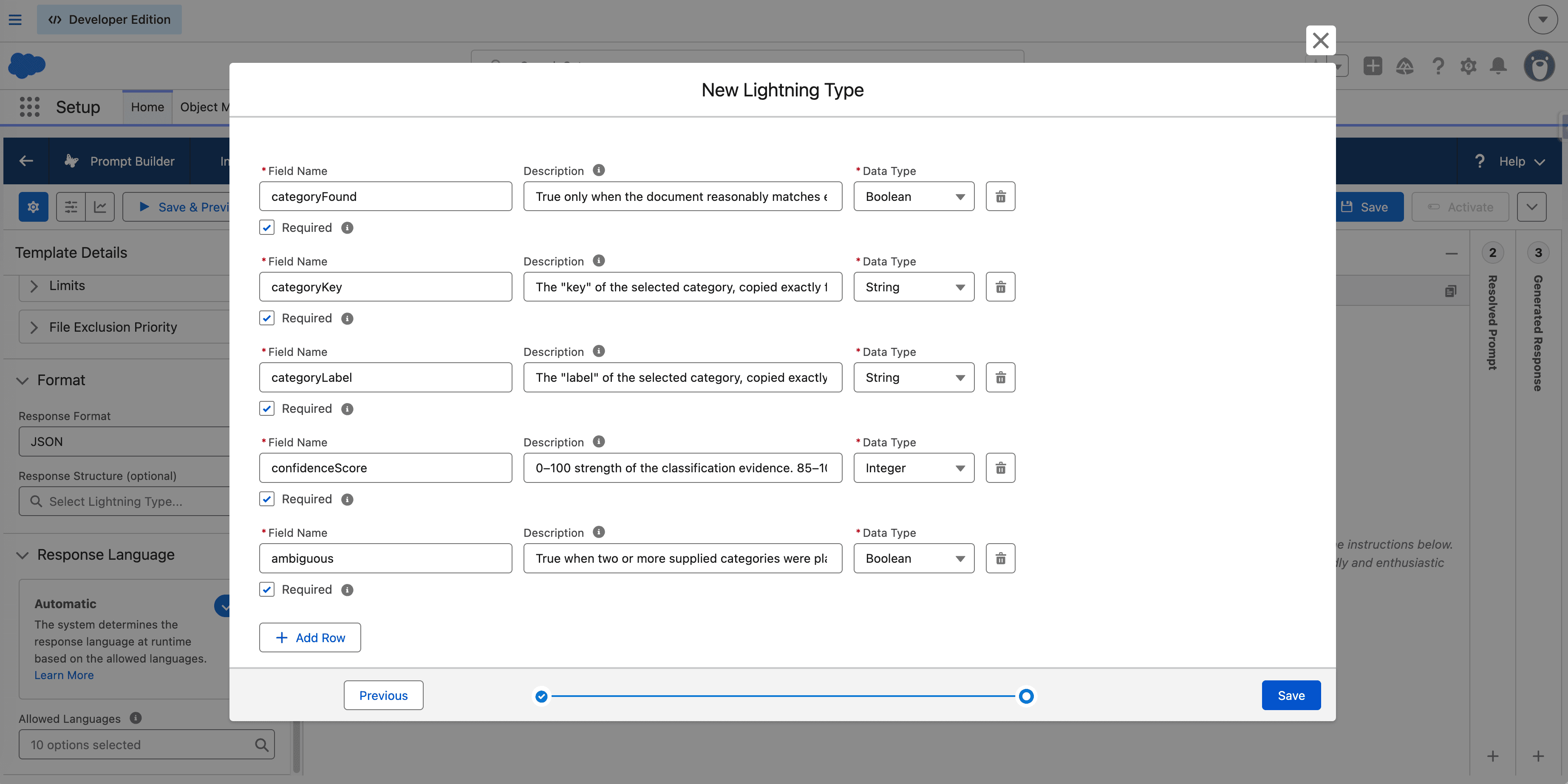
Example field definition from the JSON schema:
"confidenceScore": {
  "lightning:type": "lightning__integerType",
  "description": "0–100 strength of the classification evidence. 85–100 strong distinctive evidence; 60–84 reasonable match with some uncertainty; 0–59 weak or ambiguous."
}
Next to it sit a found flag, the category key, ambiguity and readability flags, and an evidence summary. The prompt stays free of JSON boilerplate; the format travels with the schema. Domain language stays in the middle, serialization is pushed to the boundary, and each can change without disturbing the other. Apex is only a bridge here, since an LWC cannot yet invoke a prompt template on its own. A small @AuraEnabled method passes the file and the expected categories to the template, and the boundary is one cast. Shortened below, with the guards and the setup boilerplate left out:
private static final String PROMPT_TEMPLATE = 'insuranceClaimDocumentClassifier';
...
@AuraEnabled
public static LightningTypes.insuranceClaimDocumentClassificationOutput classifyDocument(
    Id contentDocumentId,
    List<DocumentCategory> expectedCategories
) {
    ...
    input.inputParams = new Map<String, ConnectApi.WrappedValue>{
        'Input:claimDocument' => wrap(
            new Map<String, String>{
                'id' => String.valueOf(contentDocumentId),
                'type' => 'ContentDocument'
            }
        ),
        'Input:expectedCategories' => wrap(JSON.serialize(expectedCategories))
    };

    ConnectApi.EinsteinPromptTemplateGenerationsRepresentation result =
        ConnectApi.EinsteinLLM.generateMessagesForPromptTemplate(PROMPT_TEMPLATE, input);
    ...
    return (LightningTypes.insuranceClaimDocumentClassificationOutput)
        result.generations[0].structuredResponse;
}
Designing for being wrong
A classifier that is right most of the time is still wrong sometimes, so the system treats errors as normal, not exceptional. The classification is a suggestion: the customer can override any category with a dropdown, and the advisor makes the final judgment.
The UI is honest about the AI. Three typical uploads show how the model's output maps to what the customer sees.
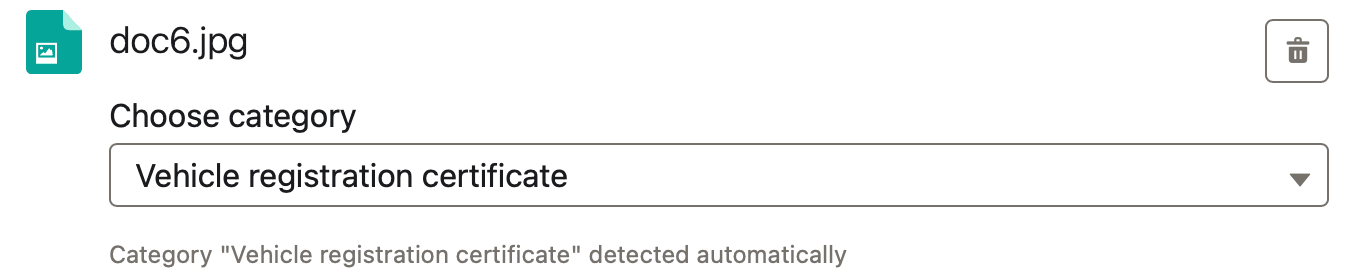
Scenario 1: high confidence, accepted quietly
A clean scan of a registration certificate gives strong, distinctive evidence:
{
  "categoryFound": true,
  "categoryKey": "vehicle-registration-certificate",
  "confidenceScore": 96,
  "ambiguous": false
}
The category is preselected, with a small caption Detected automatically. No friction for the customer who did everything right.
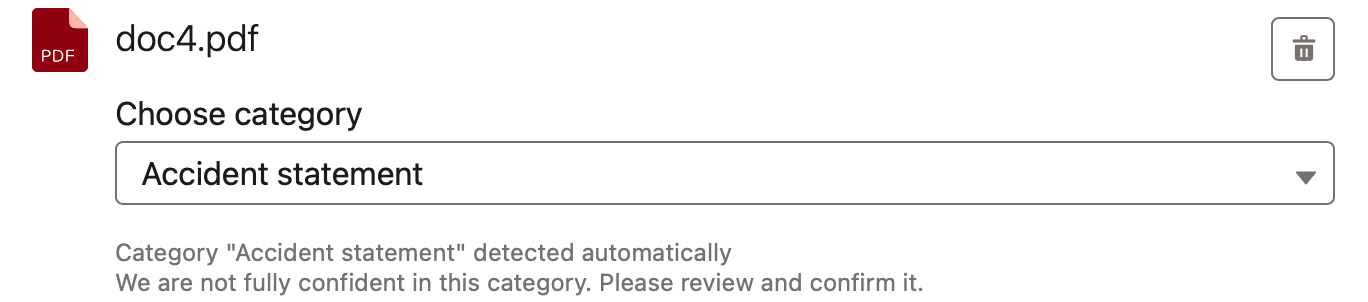
Scenario 2: ambiguous, preselected but flagged
A phone photo of the signed accident statement is both a photo and a document, so two categories look plausible at first glance, which lowers the score:
{
  "categoryFound": true,
  "categoryKey": "accident-statement",
  "confidenceScore": 71,
  "ambiguous": true
}
The best match is still preselected, but the row is flagged: We are not fully confident in this category. Please review and confirm it.
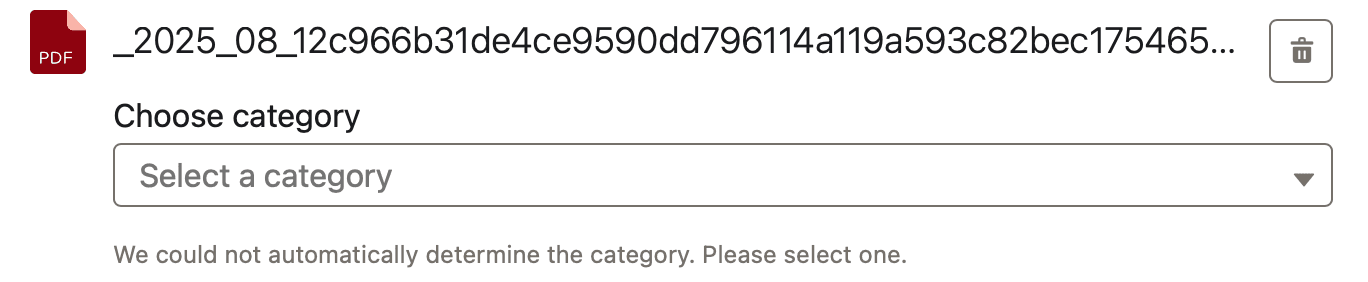
Scenario 3: no match, the customer decides
A repair-shop invoice is a reasonable thing to send, but it is not on the list:
{
  "categoryFound": false,
  "categoryKey": "",
  "confidenceScore": 12,
  "ambiguous": false
}
The dropdown stays empty: We could not automatically determine the category. Please select one.
The routing between these three states is plain deterministic code:
const needsReview =
    !matchedCategory ||
    !classification.documentReadable ||
    classification.ambiguous ||
    classification.containsMultipleDocuments ||
    classification.confidenceScore < 85;
Notice what the template does not return: a needsReview flag. The model reports facts: readable or not, ambiguous or not, one document or several, a score. The LWC turns those facts into a decision. Collapsing them into a single flag inside the prompt would bury the policy in the model. Kept apart, the threshold can change without touching the template. The UI could one day explain why a file needs review. An unreadable scan deserves a different message than an ambiguous one. (We do not do this today, but the data is already there.) And the same template could serve another surface with a stricter policy. I would not add granularity just for imagined reuse; the rule of three applies to prompts as much as to code. But keeping interpretation out of the model costs nothing here and makes the whole flow easier to follow.
One warning about the confidence score: it is the model's self-assessment, not a calibrated probability. Use it as a ranking signal, tune the threshold against a test set of real documents, and pair it with the yes/no flags such as ambiguity and readability.
Testing has already paid off. On clear documents the model is remarkably accurate, yet a photo of freshly polished, flawless car paint came back as a damage photo. Close-up of a car, therefore damage. The defenses are simple: negative examples in the category descriptions ("a photo of an undamaged vehicle is not a damage photo"), an evidence summary that must name the damage the model claims to see, and a growing test suite of exactly such hard cases. Getting a model to answer is easy; knowing when to trust the answer is where the engineering goes.
A small model, on purpose
Because the output supports the decision rather than makes it, we optimized for cost and speed and chose Gemini Flash, which balances both well. This is the payoff of everything above: when each answer is cheap, isolated, and easy to check, and a human holds the final decision, you do not need frontier-model prices.
None of it required exotic engineering: one prompt template, one Apex method, one Lightning web component. The decisions that mattered were acts of restraint: a small model, one document at a time, a typed contract, honest UI states, and a human making the final call.